Vibe Panels
Turn scrolling into a story
Side scrolling websites in seconds
Design scroll-led narratives inside Elementor. No rebuilds. No frameworks.
Build cinematic, scroll-driven panel layouts directly inside Elementor. Vibe Panels turns vertical scroll into smooth, controlled horizontal motion, no JS tinkering, no layout hacks, no compromises.
WordPress 6.0+
PHP 7.4+ (tested up to 8.2)
Elementor 3.8+
(Free or Pro)
Vibe Panel Alpha
Continue scrolling to experience Vibe Panels
Vibe Panel Bravo
No more boring endless scrolling
Build side-scrolling websites with elementor
Uses standard Elementor containers, sections, and widgets — nothing new to learn.
Vibe Panels maps vertical scroll to smooth, controlled horizontal motion while keeping your layout intact. Panels behave like normal Elementor containers — because they are. No timelines, no scripting, no layout hacks.
Outside the panel region, your page scrolls exactly as normal.
Work the way you know — and already love
Vibe Panels does not introduce a new design system or editor.
Design panels exactly as you would any other Elementor section. Use containers, widgets, background media, and motion effects the same way you always have. Vibe Panels simply changes how scroll is interpreted.
Are all the examples on this page achievable with the core plugin?
100% None of the Vibe Panels on this page use any pro or locked features. It works out-of-the-box — install it and build your panels as normal.
Where can I get this plugin?
Great question! It’s available now over on Gumroad, click the button below to start sliding. (even we cringed at that!)
Do I need to know code?
Absolutely not! Vibe Panels is built to be ‘visual first’, providing a sleek integrated UI to activate and adjust settings.
The most technical you have to be is inputting a Container ID, that’s it! (don’t worry there are tutorials)
Can I have more than one per page?
Definitely! In fact within the pro version, in the coming Vibe Suite Pro package, you can reverse the direction of a Panel section to create neat snaking motion as a user scrolls.
Enable the built in Drift movement!
There are no timelines to manage, no keyframes to maintain, and no scripts to write.
This is not a slider plugin!
Sliders move elements inside a frame. Vibe Panels moves the scroll itself.
Sliders run on timelines, autoplay rules, or gestures. Vibe Panels responds directly to the user’s scroll position, mapping movement to intent in real time.
Nothing auto-plays. Nothing loops. Nothing advances without user input.
This isn’t about adding animation. It’s about redefining how scroll behaves.
Vibe Panels for Elementor
Built with ease in mind
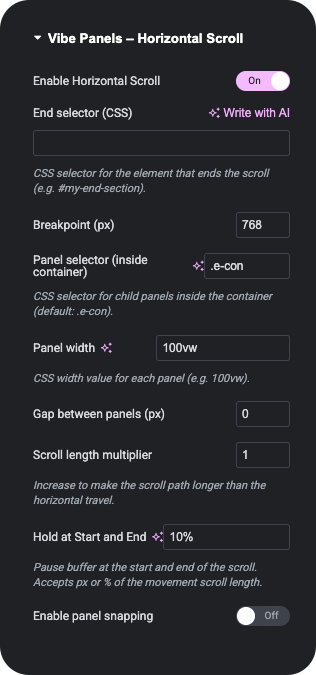
Step 1 – Enable Vibe Panels
Toggle Vibe Panels on, choose your settings, and define where the scroll begins and ends.
Step 2 - Design Normally
Build your layout using Elementor Containers just like any other section.
Step 3 – Scroll to Reveal
Vertical scroll now drives horizontal motion, with smooth pacing and full control.
You enable Vibe Panels on a container, define where the scroll should begin and end, then design your panels like any other Elementor section. As the page scrolls, vertical movement is translated into smooth horizontal motion. When the sequence ends, normal scrolling resumes automatically.
Nothing else on the page needs to change.
Who is this for?
Web Designers
Build premium experiences without reinventing your workflow.-
Design visually, not procedurally
-
Client-safe layouts
-
Multiple panel sequences per page
-
No JavaScript workflows
-
Production-ready performance
Brand Owners
Powerful effects without technical knowledge.-
Works inside Elementor
-
No code, no setup headaches
-
Content stays familiar
-
Easy to update later
-
Professional results, instantly
Not a slider. Not an animation builder.
Supercharge your content
Turn long pages into paced experiences. Vibe Panels lets you guide attention, reveal content progressively, and shape how stories unfold as users scroll.
This entire section is a single, continuous sequence — driven by scroll, not scripts.
CONTROL PACING, NOT ANIMATION
These ones snap at the edges!
BUILT TO STAY OUT OF YOUR WAY
Everything is built and edited visually using Elementor’s existing layout, styling, and content tools — exactly as you already use them.
These ones snap at the edges!
Fast by design.
Lightweight but packed with punch
SMOOTH MOTION. MINIMAL FOOTPRINT. MAXIMUM CONTROL.
It also has a progress bar!
SCROLL SETS THE RHYTHM
More details:
Are you ready for Vibe Panels?
Download Vibe Panels and go live within minutes.
Fair, Fixed Pricing
Vibe Panels is available directly via Gumroad with clear, transparent pricing and no hidden tiers.
You pay once for a single-website license, download instantly, and start building right away.
Any discounts or promotions are applied automatically at checkout when available.
Technical Specifications
Minimum Requirements
- WordPress 6.0 or higher
- Elementor 3.8 or higher
- PHP 7.4 or higher (tested up to 8.2)
Compatibility Notes
Works with standard themes using Elementor Containers. No external scripts required. Front-end scroll support respects reduced-motion accessibility preferences.
Browser Support
Latest versions of Chrome, Firefox, Safari, Edge and Chromium-based browsers.
Installation & Activation Guide
Download & Install
What you’ll learn in this video.
- Uploading and activating via WordPress Plugins panel
- Accessing Vibe Panels settings in Elementor
How Vibe Panels Works
'go live' launchpad
What you’ll learn in this video.
- How panels are enabled
- Settings explained
- How panel content stays editable in Elementor
Licensing, Updates & Refunds
Purchasing & Licensing
All purchases are handled securely through Gumroad. Your license grants usage on a single website, with access to the latest available version at the time of purchase.
Refunds
Refunds are handled in accordance with Gumroad’s refund policy.
If you have questions about a purchase or believe a refund may be applicable, you can submit a request directly through your Gumroad account.
Support Policy
Support is provided directly by the developer and covers installation questions, usage guidance, and verified issues related to Vibe Panels.
Support availability and response times are outlined clearly at the point of purchase on Gumroad.
Terms & Conditions
By purchasing Vibe Panels, you agree to the usage terms outlined on the Gumroad product download page, including licensing scope and permitted use.